
 Sign in to Fortress OS
Screening in the profile
Start the request from the Resident Profile. Your connected provider runs the check.

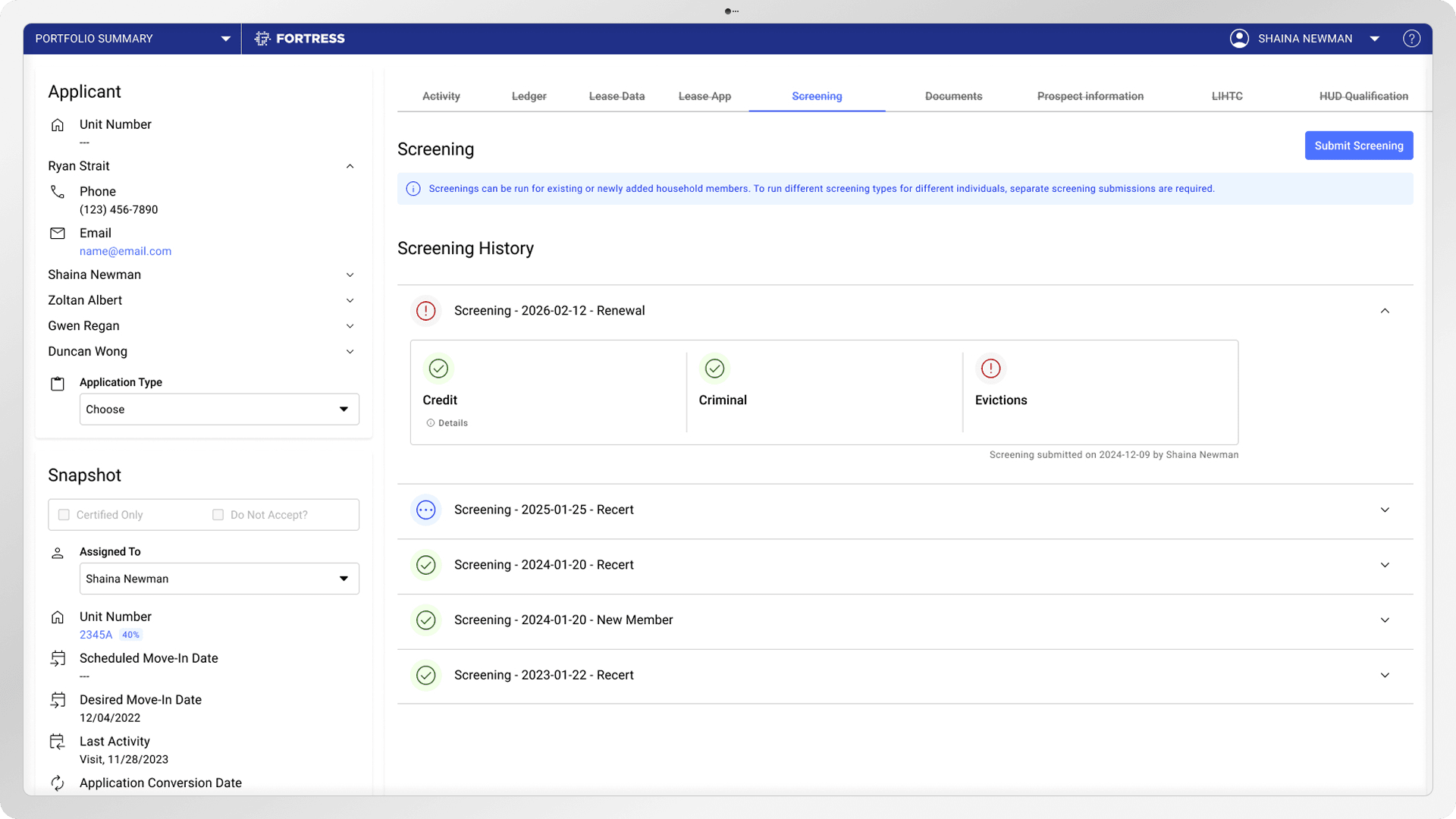
What is resident screening in Fortress OS?
Fortress OS runs the screening workflow, not the screening itself. It lives inside the Resident Profile and connects to a screening provider like TransUnion, so your team starts a request without opening another system.
And it isn't just a move-in task. Details from the online application carry straight into the request, so nobody retypes a birthdate twice.
Move-in applicants
Screen a new applicant before they sign.
Lease renewals
Re-check when the lease comes up again.
Recertifications
Verify income and eligibility at recert.
New household members
Screen someone who joins the home later.
How does screening work inside Fortress?

Open the Screening tab
Open the Resident Profile and go to the Screening tab, where every screening lives.
Start a screening
Click Submit Screening and pick the household member you want to screen.
Pick the purpose and type
Choose why you're screening, like a renewal, and which check to run.
Fortress checks the details
Fortress flags any missing member info, like income, before the request submits.
Results land on the profile
Your provider returns the results, and the full screening history stays on the profile.
Who does what?
Fortress runs the workflow. A connected provider runs the screening. Coordination, not replacement.


Fortress is not a consumer reporting agency. TransUnion and other connected providers run the screening and produce the report. Your team reviews it and makes the decision.
What's inside Fortress resident screening?
Screening tools built around the Resident Profile, not a separate system to manage.
Dedicated Screening tab
Every household member's screening options live in one tab on their Resident Profile.
Purpose-based requests
Pick new applicant, renewal, recert, or new household member, so the reason travels with the request.
Pre-submit validation
Fortress flags missing names, dates, income, or Social Security numbers before you submit.
Centralized history
Every screening request and result logs to the Activity tab, so nothing gets lost in email.
Permission controls
Only staff with screening permission can start a request, so access stays locked down.
Document storage
Provider reports and documents save to the Documents tab with the rest of the resident's file.
Provider integration setup
Turn screening on or off per property once your connected screening provider is set up.
Why teams like it
Fewer tabs open
Screening lives where the resident record already lives, so there's no swivel-chair between portals.
Clear visibility
Everyone on the team sees screening status and results in one spot, not buried in someone's inbox.
Simpler audits
A full history of requests and documents sits on the profile, ready when a monitor comes asking.
How do I set up screening?
Two steps, then you're running.
Connect a verified provider like TransUnion. See integrations
Enable it property by property.
FCRA & fair housing
Screening uses a consumer report, so a few rules apply.
Pull a report only for a real housing decision. FCRA
Turn someone down on the report? Send an adverse action notice that names the provider. FCRA
Use the same written standards for every applicant. Fair housing
Fortress keeps the workflow consistent. Your team makes the call.
Explore the workflow around screening
Connect a screening provider
See how Fortress connects to TransUnion and other verified providers.
Explore integrationsWhere applicants start
Applicants apply online, and their info carries into the screening request.
See the applicationAfter the screening's done
Move an approved applicant straight into a lease without re-entering their info.
See leasingThe Resident Profile
Screening is one tab inside the Resident Profile that holds the whole resident record.
See Fortress CoreA real screening workflow
See how a Walker & Dunlop client runs resident screening day to day.
Read the case studyResident screening FAQs
Straight answers on what Fortress does, what your provider does, and where screening lives.
Contact UsDoes Fortress perform the screening?
No. Fortress organizes the request and shows the results. Your connected provider, like TransUnion, runs the actual check and creates the report.
Is TransUnion integrated?
Yes. TransUnion is a verified screening provider you can connect, so requests route straight from the Resident Profile to TransUnion.
Where do users start?
In the Resident Profile. Open the household's profile, go to the Screening tab, and start the request there.
Can it be used for recerts and renewals?
Yes. Pick new applicant, renewal, recertification, or new household member as the reason, and the request follows that purpose. Certifications themselves live in Fortress Compliance.
Does Fortress store screening documents?
Yes. Provider reports and documents save to the Documents tab on the Resident Profile, right alongside the rest of the file.
Who can request a screening?
Only staff with the screening permission. That keeps who can start a request limited to the right people.
Does Fortress decide pass or fail?
No. Fortress does not score or decide anything. Your provider creates the report and results, and your team makes the call.
Can each property turn it on or off?
Yes. Screening is enabled per property, so you can roll it out where you need it and skip it elsewhere.